Immich is a self-hosted alternative to Google Photos. I’ve been running an instance for a few months now, and it’s great. Immich’s docs has a sample NGINX config, but there are a few changes you’ll probably want to make to it.
Prevent indexing
In the location / { ... } block, you should probably add a line that says add_header X-Robots-Tag "noindex, nofollow"; to prevent search engine crawlers from indexing your site. There’s usually no reason to have your Immich site show up in search results, but more importantly, blocking indexing could protect your site from being considered a phishing site. Many people running Immich instances have suddenly found their sites to be showing everyone this scary-looking error:
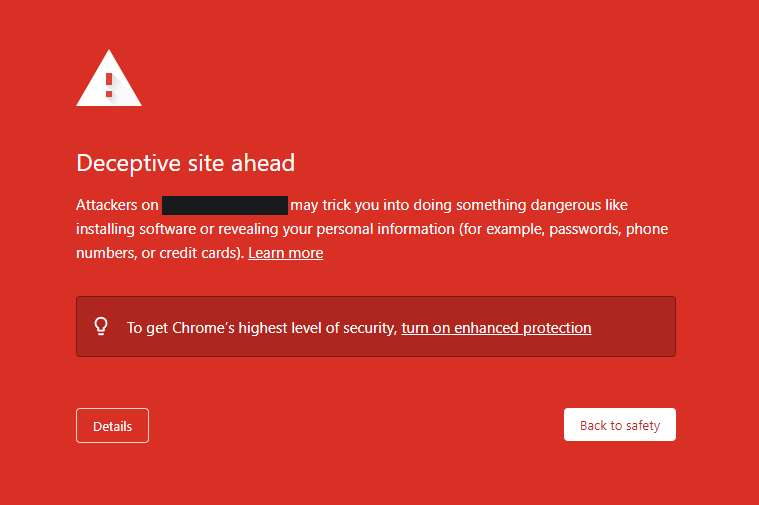
Although it’s not 100% clear why Immich sites sometimes get this error, the current theory seems to be that since the login pages of all Immich instances are nearly identical, Google’s crawlers assume the login pages are trying to trick visitors into thinking they’re on a different site’s login page. There is also speculation that Google is just trying to make things more difficult for competitors. When a site is blocked for phishing by Google, a similar error appears for the site on all major browsers because they share data about phishing sites. Telling crawlers to ignore your site might protect it from this.
The error appears not only for Immich sites, but for the sites of many other self-hosted services as well. Here are some discussions gathered by Sergey Katsubo about domains being blocked for phishing supposedly due to uniform login pages:
- Immich: https://www.reddit.com/r/immich/comments/1ne5jbq/google_has_blocked_my_domain_due_to_immich/
- Jellyfin: https://github.com/jellyfin/jellyfin-web/issues/4076
- Yunohost: https://forum.yunohost.org/t/google-flags-my-sites-as-dangerous-deceptive-site-ahead/20361
- n8n: https://community.n8n.io/t/deceptive-site-ahead-urgent/24152
- Nextcloud: https://www.reddit.com/r/NextCloud/comments/w3x0fs/google_marked_my_nextcloud_app_as_a_dangerous/
Currently, the only way to customize an Immich site’s login page is to set a custom welcome message. There’s a chance having a unique welcome message would help prevent the error. You can set your instance’s custom welcome message by following these steps:
- In the browser version of your Immich site, click your profile photo in the top right.
- Click “Administration”.
- Click “Settings” on the left.
- Scroll down and click “Server Settings”.
- Enter the welcome message and save the changes.
If your Immich site gets marked as a phishing site, you can submit a report to Google to try to get it reversed.
More details about the X-Robots-Tag header.
Split logs by subdomain
If you happen to have multiple subdomains managed by one NGINX instance, it could be helpful to put each subdomain’s log entries into their own files. You can accomplish this by adding something like access_log /var/log/nginx/my_subdomain.example.com.access.log; into the server block of each subdomain. Replace the /var/log/nginx/ part with the path to wherever NGINX puts log files on your system, and replace my_subdomain.example.com with the subdomain.